Customizing the new Linux Terminal App in Android 15/16
We have come a long way since Termux and proot :)
Android 15 and 16 on Pixel phones allow you to run a fully fledged virtual machine on your device. As a happy new owner of a Pixel 10 Pro I was eager to find out how well it works. The short summary is that it works very well! But…
The terminal app itself is lacking any customization, not even font size, so I decided to dig a little bit deeper into how it works. The default theme of Courier (?) font and a grey background is fine, but what if you want to change it?
Looking at the official docs it seems that the Linux Terminal App is actually a WebView that connects to ttyd service running inside the VM. That is an interesting approach, and to be honest I didn’t even notice it is a WebView.
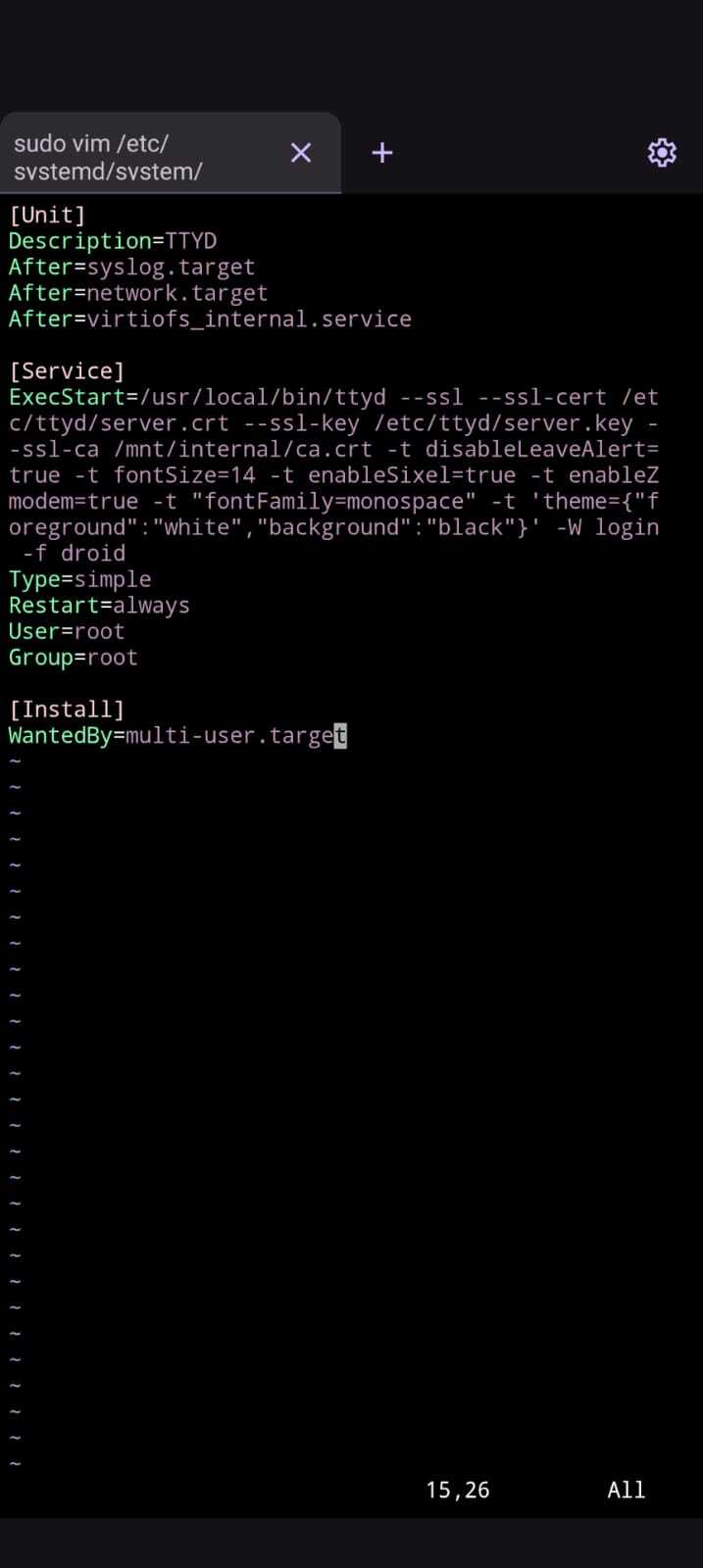
In order to customize your session you need to edit the /etc/systemd/system/ttyd.service with your favorite editor.
You need to modify the ExecStart line to add client options with the -t arguments. For example I added:
-t fontSize=14 -t "fontFamily=monospace" -t 'theme={"foreground": "white", "background": "black"}'
to change the font size from the default (should be 15), font to monospace which should be Droid Sans Mono on Pixel phones and to change the theme to a black background to make it more contrasty.
In the end I ended up with something like this:
It should also be possible to add custom fonts but I didn’t try it yet as I didn’t want to recompile ttyd.
Happy hacking!